🔐 W1seGuy CTF - XOR Encryption Challenge
Introduction

Today we have an exciting TryHackMe challenge that we will go through . It is a XOR encryption based challenge that tests how well you understand XOR cipher and know how to use it to decrypt the encrypted flags. Sounds like a fun challenge! On their website, it is given as an easy challenge that should take 5 mins, but I can assure you that, as a beginner it took me well over an hour to understand and type the necessary scripts and capture the flags. Over all, I learnt a lot more about XOR cryptography than I thought I knew. Let us now see how we go about solving this challenge 👨🏻💻
The Challenge
At the core, the CTF is straightforward. We have 2 flags we need to capture. The XOR encryption happens over a server which we have to connect to first (we are free to use any tool to connect to the server). On successful connection , the server sends XOR encoded text (in Hex) and asks us for the Encryption key.
Understanding the basics + Analysing the source code
what even is XOR encryption? 🤔
In cryptography, the simple XOR cipher is a type of additive cipher, an encryption algorithm.
"Exclusive Or", or XOR for short is a logical operator that can be found in a lot of cryptographic constructions. This is due to XOR's invertibility (the inverse of XOR is XOR itself) and its perfect balance of potential output values given their input values.
When used in a mathematical context, XOR is usually represented as the symbol ⊕. In programming languages you'll often see the symbol ^ being used for bitwise XOR.
XOR Truth Table for reference
| a | b | a⊕b |
|---|---|---|
| 0 | 0 | 0 |
| 0 | 1 | 1 |
| 1 | 0 | 1 |
| 1 | 1 | 0 |
The challenge encrypts the plaintext using XOR:
ciphertext = plaintext XOR key
Since XOR is reversible, the same operation can be used to recover the key:
key = ciphertext XOR plaintext
The only requirement is knowing the plaintext at the corresponding position
Now, TryHackMe provides a python file that shows exactly how the XOR encryption takes places. It defines all the functions and methods. It also provides us the Key size. Make sure you go through the code you understand the behind the scenes of how the encryption takes place.
From the source code, I’m pasting a section that highlights the main encryption logic and key validation logic
def setup(server, key):
    flag = 'THM{thisisafakeflag}'
    xored = ""

    for i in range(0,len(flag)):
        xored += chr(ord(flag[i]) ^ ord(key[i%len(key)]))

    hex_encoded = xored.encode().hex()
    return hex_encoded

def start(server):
    res = ''.join(random.choices(string.ascii_letters + string.digits, k=5))
    key = str(res)
    hex_encoded = setup(server, key)
    send_message(server, "This XOR encoded text has flag 1: " + hex_encoded + "\n")

    send_message(server,"What is the encryption key? ")
    key_answer = server.recv(4096).decode().strip()

    try:
        if key_answer == key:
            send_message(server, "Congrats! That is the correct key! Here is flag 2: " + flag + "\n")
            server.close()
        else:
            send_message(server, 'Close but no cigar' + "\n")
            server.close()
    except:
        send_message(server, "Something went wrong. Please try again. :)\n")
        server.close()
Steps to capture the flags
Let us log into TryHackMe’s attacker and lab Virtual machines. Once you’re logged into the attacker machine, open the terminal. We are told that the server where the encryption is happening is listening on port 1337 via TCP.
We will use Netcat to connect to this server, type in nc 10.48.173.82 1337 (here 10.48.173.82 is the server.)
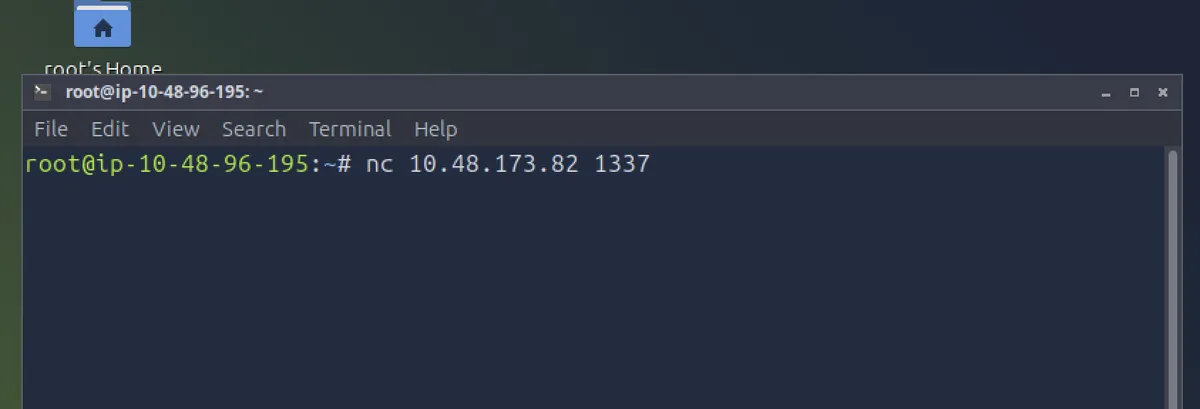
Once we are successfully listening in on the server, the server shows us the XOR encoded flag and asks us for the encryption key. This encoded text value will be different every-time you restart the server. In my case the XOR encoded text is computed as
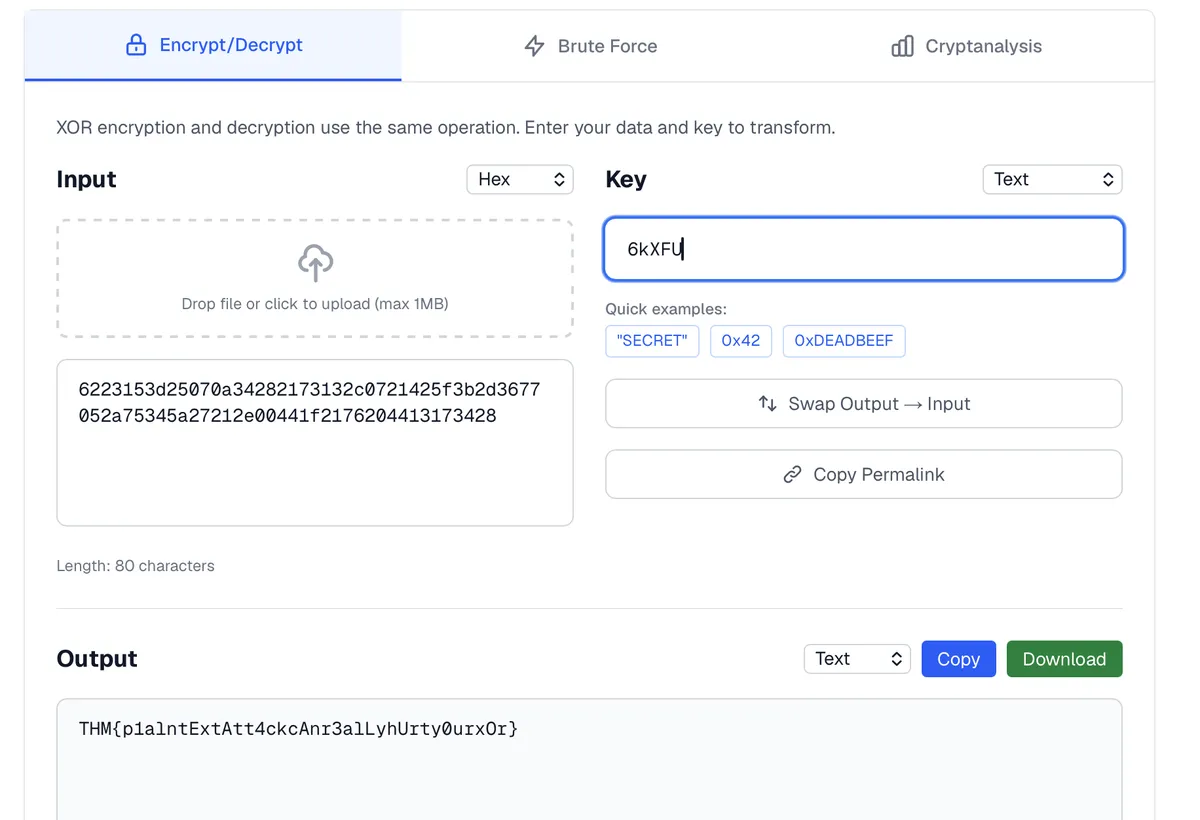
6223153d25070a34282173132c0721425f3b2d3677052a75345a27212e00441f2176204413173428
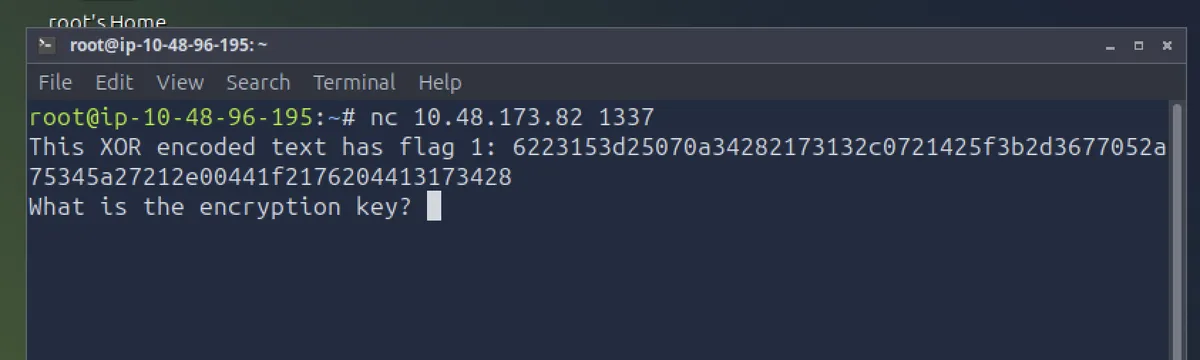
Now before moving forward, lets talk about few important observations, From the source code and the TryHackMe flag format, we know:
- Every flag starts with:
THM{ - Every flag ends with:
} - The encryption key is exactly 5 characters long (We know this from source code file, where k = 5) so as the key repeats every five characters, recovering five key bytes is enough to reconstruct the complete key.
with that now being clear, we actually now know the first 4 characters of plaintext as thm{
we also know that the key repeats every 5 characters. The XOR encoded text is 40 characters so the last character of the encoded text should correspond with the } character.
The logic we will use to retrieve the key is simply the Inverse XOR property where,
key = ciphertext XOR plaintext
I’ve made a python script that automatically computes the key for us when we have the key size and know that the plaintext starts with thm{ and ends with } but I will also manually show you how we will calculate the first character of the key using the above formula.
1st Key character calculation
The first plain text character is T : 0x54 (T in ASCII is 84 which in hex format is 0x54)
The first character from the encoded text is 62 : 0x62 (as its a hex value)
Key = 0x54 XOR 0x62
= 0x36
= 6 (in ASCII)
This value is obtained by converting 0x54 and 0x62 in binary, then XOR’ing them and then converting it back into hex)
This same exact process is done for the rest of the characters as well. I’ll now discuss the python script I used to recover the entire key.
Python Script for Key Recovery
cipher_hex = "6223153d25070a34282173132c0721425f3b2d3677052a75345a27212e00441f2176204413173428"

cipher = bytes.fromhex(cipher_hex)

KEY_LEN = 5

key = ['?'] * KEY_LEN

# Recover first four key bytes from "THM{"
known_prefix = b"THM{"

for i in range(len(known_prefix)):
    key[i] = chr(cipher[i] ^ known_prefix[i])

# Recover last key byte from the closing '}'
last_index = len(cipher) - 1
key[last_index % KEY_LEN] = chr(cipher[-1] ^ ord('}'))

key = ''.join(key)
The script starts by storing the cipher hex value and then coverting the hexadecimal value into bytes using bytes.fromhex() . It is a built in python method.
Then I am creating a variable to store the key length and the key itself. The key is temporarily stored as [?,?,?,?,?]
Then, since we already know first 4 characters of the plaintext, we store it in the known_prefix variable
for i in range(len(known_prefix)):
    key[i] = chr(cipher[i] ^ known_prefix[i])
In this part of the code above, through a for loop, we compute the key value using the inverse XOR logic (cipher XOR plaintext) for the existing characters of the plaintext we already know (thm{)
last_index = len(cipher) - 1
key[last_index % KEY_LEN] = chr(cipher[-1] ^ ord('}'))
In this final part of the code, we compute the last index value of the cipher text (note that in programming, list indices start from 0 and not from 1, so in our case for our ciphertext - which is 40 bytes / characters long, the last index value will be 39)
key[last_index % KEY_LEN] = chr(cipher[-1] ^ ord('}'))
In the code above, using the last_index value (39 in our case) and the key length (k=5) , we can exactly store at which position in our key we want to place the final key value.
Key[39 % 5] = 4 (39 MOD 5) is essentially what is being computed here.
then all that is left to compute is the key value using the same logic we used earlier (cipher XOR plaintext ) . We already know the flag ends with } so the script will convert the } ASCII character into decimal and then into hex for the XOR with the final cipher text value (0x28 in our case)
finally we have computed all the values in our key and we simply convert it from a list to a string.
Once you type in the ciphertext value and key length, run the program and you should get the key computed like in the image below.
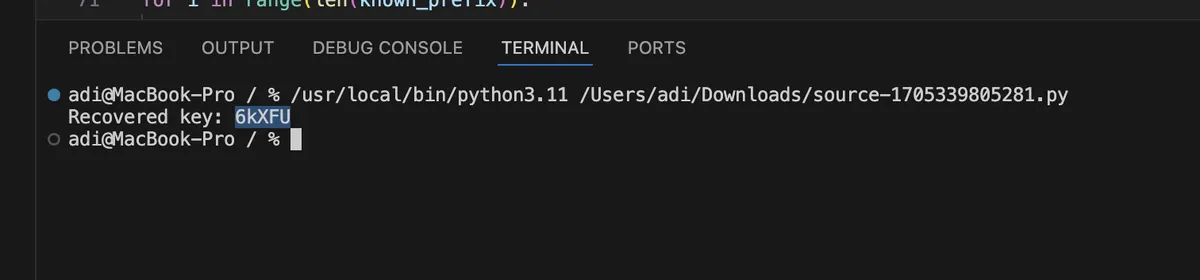
Copy the Key and type it in back in the terminal where it asked for the encryption key. It will accept the key and provide us with 2nd flag, But hold on - what about the first flag?
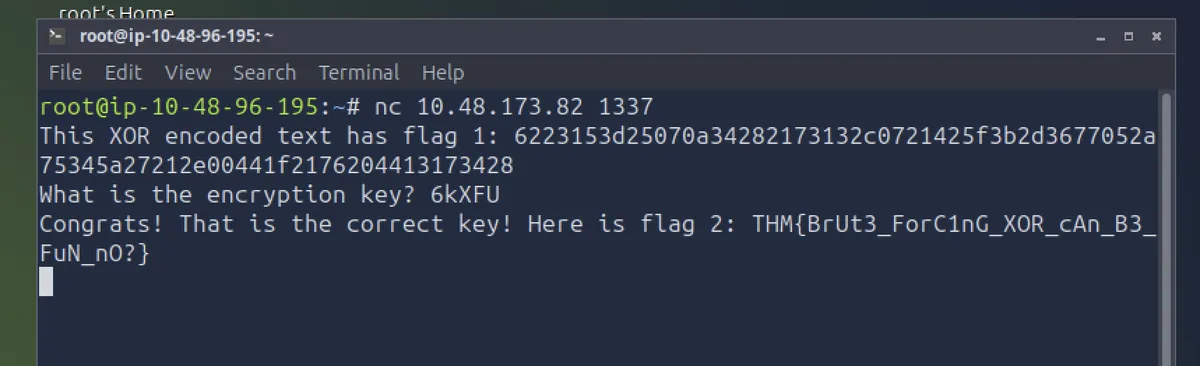
well since we have the key now, we can decrypt the encoded flag1 text. Theres two ways we can do this, either program the logic (plaintext = ciphertext XOR key) or use a XOR decryption website. I’ll show you both ways.
Python script to decode plaintext
plaintext = []
for i in range(len(cipher)):
    plaintext.append(chr(cipher[i] ^ ord(key[i % len(key)])))

plaintext = ''.join(plaintext)
print("Recovered Plaintext is: ", plaintext)

We successfully decoded the flag! Alternatively, we can use an online website like this one and type in our cipher text and key and get the decoded plaintext
THM{p1alntExtAtt4ckcAnr3alLyhUrty0urxOr}
We successfully captured both flags! 🥳
Conclusion
Overall this was a fun and exciting challenge. I personally learnt a lot more about XOR cipher through trying to capture the flags. I plan on doing such more challenges, its a great way to skill up and enforce important cybersecurity concepts in a practical way.
If you followed along, I hope you enjoyed reading this article :)